Toyota Avalon (XX50): Additional Key cannot be Registered. Open in Front Floor Electrical Key Oscillator Circuit (B27A5). Open in Rear Floor Electrical Key Oscillator Circuit (B27A6)
Additional Key cannot be Registered
DESCRIPTION
If additional
registration is not possible, a malfunction of the electrical key
transmitter sub-assembly, certification ECU (smart key ECU assembly),
power switch, No. 1 indoor electrical key antenna assembly (front
floor), steering lock ECU (steering lock actuator or upper bracket
assembly) or door control receiver is suspected.
CAUTION / NOTICE / HINT
NOTICE:
- If registration of an electrical key transmitter sub-assembly cannot be performed, refer to Registration.
Click here 
- When using the Techstream with the power switch off, connect the
Techstream to the DLC3 and turn a courtesy light switch on and off at
intervals of 1.5 seconds or less until communication between the
Techstream and the vehicle begins. Then select the vehicle type under
manual mode and enter the following menus: Body Electrical / Smart Key.
While using the Techstream, periodically turn a courtesy light switch on
and off at intervals of 1.5 seconds or less to maintain communication
between the Techstream and the vehicle.
- The smart key system (for Start Function, HV Model) uses the LIN
communication system and CAN communication system. Inspect the
communication function by following How to Proceed with Troubleshooting.
Troubleshoot the smart key system (for Start Function, HV Model) after
confirming that the communication systems are functioning properly.
Click here
- Before replacing the certification ECU (smart key ECU assembly),
steering lock ECU (steering lock actuator or upper bracket assembly) or
electrical key transmitter sub-assembly, refer to Registration.
Click here
- After repair, confirm that no DTCs are output.
HINT:
When additional registration is not possible, freeze frame data may be stored in the certification ECU (smart key ECU assembly).
Click here
PROCEDURE
(a) Check for DTCs.
Body Electrical > Smart Key > Trouble Codes
NOTICE:
If a malfunction occurs, do not remove/install the vehicle auxiliary battery before checking for DTCs.
OK:
DTCs are not output.
| NG |  |
GO TO DIAGNOSTIC TROUBLE CODE CHART |
|
OK |
 | |
| 2. |
READ VALUE USING TECHSTREAM (UNMATCHED VEHICLE-ID) |
(a) Connect the Techstream to the DLC3.
(b) Turn the power switch on (IG).
(c) Turn the Techstream on.
(d) Enter the following menus: Body Electrical / Smart Key / Data List.
(e) Read the Data List according to the display on the Techstream.
Body Electrical > Smart Key > Data List
|
Tester Display | Measurement Item |
Range | Normal Condition |
Diagnostic Note |
|
Unmatched Vehicle-ID | Key No. (incorrect or correct) |
No or Yes | No: Communication normal
Yes: Communication malfunction |
The
vehicle ID registered in the vehicle and the vehicle ID registered in
the electrical key transmitter sub-assembly are different (if a key from
another vehicle is brought into the vehicle exterior detection area
while the doors are locked, "Yes" is displayed for "Unmatched
Vehicle-ID" in the Data List). Other potential causes:
- An electrical key transmitter sub-assembly from a different vehicle is being used.
- A communication error due to wave interference.
- The electrical key transmitter sub-assembly or certification ECU (smart key ECU assembly) is malfunctioning.
|
Body Electrical > Smart Key > Data List
|
Tester Display |
| Unmatched Vehicle-ID |
|
Result | Proceed to |
|
"No" is displayed | A |
|
"Yes" is displayed | B |
| B |
| GO TO STEP 5 |
|
A | |
| |
| 3. |
CHECK SMART KEY SYSTEM (for Start Function, HV Model) |
(a) Remove the transmitter battery from the electrical key transmitter sub-assembly.
| (b)
With the brake pedal depressed, hold the electrical key transmitter
sub-assembly near the power switch and check if the power source mode
changes. OK: The power source mode changes. HINT: If the power source mode changes, the cabin verification is malfunctioning. |
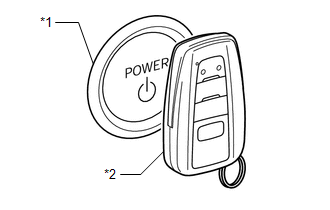 |
|
*1 | Power Switch | |
*2 | Electrical Key Transmitter Sub-assembly | | |
|
Result | Proceed to |
|
The power source mode changes |
A |
| The power source mode does not change |
B |
| B |
| GO TO SMART KEY SYSTEM (for Start Function, HV Model) (Power Source Mode does not Change to ON (IG and ACC)) |
|
A | |
| |
| 4. |
CHECK STEERING LOCK FUNCTION |
(a) The power switch is on (ACC) or on (IG).
(b) Check that the steering unlocks.
HINT:
- When the power switch is turned on (ACC) or on (IG) and the electrical
key transmitter assembly and certification ECU (smart key ECU assembly)
are verified, the steering is unlocked.
- Check that the communication between the steering lock ECU (steering
lock actuator or upper bracket assembly) and certification ECU (smart
key ECU assembly) is normal.
OK:
The steering unlocks.
| NG |
| GO TO SMART KEY SYSTEM (for Start Function, HV Model) (Unable to Unlock Steering Wheel (Hybrid Control System cannot Start)) |
|
OK | |
| |
(a) Using an unregistered electrical key transmitter sub-assembly, perform the additional registration procedure.
Click here
OK:
Additional registration can be completed.
| OK |
| REPLACE ELECTRICAL KEY TRANSMITTER SUB-ASSEMBLY (FIRST REGISTERED KEY WAS DEFECTIVE) |
|
NG | |
| |
| 6. |
REPLACE CERTIFICATION ECU (SMART KEY ECU ASSEMBLY) |
(a)
Temporarily replace the certification ECU (smart key ECU assembly) with
a new one and register the electrical key transmitter sub-assemblies.
HINT:
- For replacement.
Click here
- For registration.
Click here
OK:
All
of the electrical key transmitter sub-assemblies could be registered to
the new certification ECU (smart key ECU assembly) successfully.
| OK |
| END (CERTIFICATION ECU (SMART KEY ECU ASSEMBLY) WAS DEFECTIVE) |
| NG |
| GO TO OTHER PROBLEM (New key cannot be Registered) |
Open in Front Floor Electrical Key Oscillator Circuit (B27A5)
DESCRIPTION
The
certification ECU (smart key ECU assembly) generates a request signal
and transmits the signal to the No. 1 indoor electrical key antenna
assembly (front floor). For the No. 1 indoor electrical key antenna
assembly (front floor) to detect when the electrical key transmitter
sub-assembly is in the cabin, the signal from the certification ECU
(smart key ECU assembly) requesting a response from the electrical key
transmitter sub-assembly is transmitted inside the vehicle. DTC B27A5 is
stored by the certification ECU (smart key ECU assembly) when an open
is detected between the certification ECU (smart key ECU assembly) and
No. 1 indoor electrical key antenna assembly (front floor) (between
terminals CLG5 and ANTE5, or terminals CG5B and CLGB).
|
DTC No. | Detection Item |
DTC Detection Condition | Trouble Area |
Note |
| B27A5 |
Open in Front Floor Electrical Key Oscillator Circuit |
An
open is detected in the circuit between the certification ECU (smart
key ECU assembly) and No. 1 indoor electrical key antenna assembly
(front floor) (CLG5 - ANTE5, CG5B - CLGB) (1 trip detection logic*). |
- Certification ECU (smart key ECU assembly)
- No. 1 indoor electrical key antenna assembly (front floor)
- Wire harness or connector
|
|
- *: Only output while a malfunction is present.
Vehicle Condition and Fail-safe Operation when Malfunction Detected |
Vehicle Condition when Malfunction Detected |
Fail-safe Operation when Malfunction Detected |
|
When electrical key transmitter sub-assembly is in front seat area:
- Power source mode does not change when power switch pressed
- Electrical key transmitter sub-assembly locked inside vehicle
| - |
Related Data List and Active Test |
DTC No. | Data List and Active Test |
|
B27A5 | Key diagnostic mode can be used to perform troubleshooting |
WIRING DIAGRAM
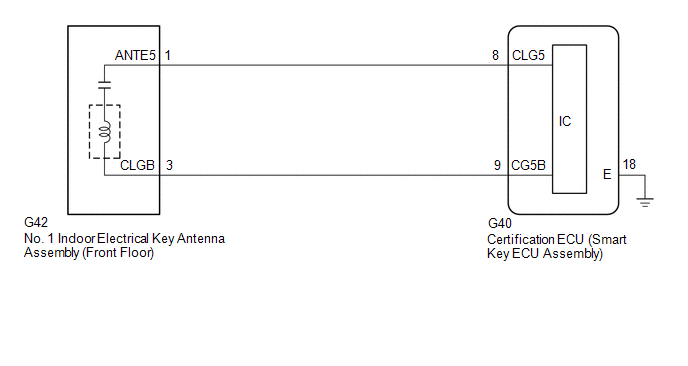
CAUTION / NOTICE / HINT
NOTICE:
- When using the Techstream with the power switch off, connect the
Techstream to the DLC3 and turn a courtesy light switch on and off at
intervals of 1.5 seconds or less until communication between the
Techstream and the vehicle begins. Then select the vehicle type under
manual mode and enter the following menus: Body Electrical / Smart Key.
While using the Techstream, periodically turn a courtesy light switch on
and off at intervals of 1.5 seconds or less to maintain communication
between the Techstream and the vehicle.
- The smart key system (for Start Function, HV Model) uses the LIN
communication system and CAN communication system. Inspect the
communication function by following How to Proceed with Troubleshooting.
Troubleshoot the smart key system (for Start Function, HV Model) after
confirming that the communication systems are functioning properly.
Click here 
- Before replacing the certification ECU (smart key ECU assembly), refer to Registration.
Click here
- After repair, confirm that no DTCs are output by performing "DTC Output Confirmation Operation".
PROCEDURE
|
1. | CHECK CONNECTOR CONNECTION |
(a)
Check that the connectors are properly connected to the certification
ECU (smart key ECU assembly) and No. 1 indoor electrical key antenna
assembly (front floor).
OK:
Connectors are properly connected.
| NG |
 | CONNECT CONNECTORS PROPERLY |
|
OK |
 | |
| 2. |
CHECK
HARNESS AND CONNECTOR (CERTIFICATION ECU (SMART KEY ECU ASSEMBLY) - NO.
1 INDOOR ELECTRICAL KEY ANTENNA ASSEMBLY (FRONT FLOOR)) |
(a) Disconnect the G40 certification ECU (smart key ECU assembly) connector.
(b) Disconnect the G42 No. 1 indoor electrical key antenna assembly (front floor) connector.
(c) Measure the resistance according to the value(s) in the table below.
Standard Resistance:
|
Tester Connection | Condition |
Specified Condition |
|
G40-8 (CLG5) - G42-1 (ANTE5) |
Always | Below 1 Ω |
|
G40-9 (CG5B) - G42-3 (CLGB) |
Always | Below 1 Ω |
(d) Reconnect the G40 certification ECU (smart key ECU assembly) connector.
| NG |
| REPAIR OR REPLACE HARNESS OR CONNECTOR |
|
OK | |
| |
| 3. |
CHECK CERTIFICATION ECU (SMART KEY ECU ASSEMBLY) (OUTPUT TO NO. 1 INDOOR ELECTRICAL KEY ANTENNA ASSEMBLY (FRONT FLOOR)) |
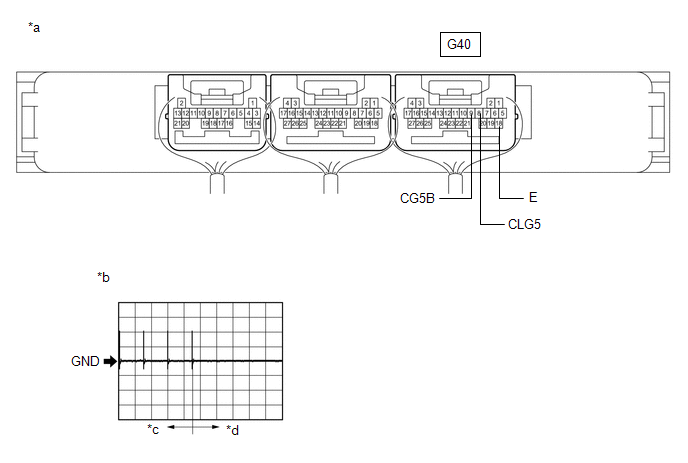
|
*a | Component with harness connected
(Certification ECU (Smart Key ECU Assembly)) |
*b | Waveform |
|
*c | For 30 seconds after any door closed |
*d | After 30 seconds or more have elapsed since any door closed |
(a) Using an oscilloscope, check the waveform.
OK:
|
Tester Connection | Condition |
Tool Setting | Specified Condition |
|
G40-8 (CLG5) - G40-18 (E) | Procedure:
- Power switch off
- Electrical key transmitter sub-assembly not inside vehicle
- Within 30 seconds of closing any door
| 2 V/DIV., 500 ms/DIV. |
Pulse generation (See waveform) |
|
G40-9 (CG5B) - G40-18 (E) | Procedure:
- Power switch off
- Electrical key transmitter sub-assembly not inside vehicle
- Within 30 seconds of closing any door
| 2 V/DIV., 500 ms/DIV. |
Pulse generation (See waveform) |
| OK |
| REPLACE NO. 1 INDOOR ELECTRICAL KEY ANTENNA ASSEMBLY (FRONT FLOOR) |
| NG |
| REPLACE CERTIFICATION ECU (SMART KEY ECU ASSEMBLY) |
Open in Rear Floor Electrical Key Oscillator Circuit (B27A6)
DESCRIPTION
The
certification ECU (smart key ECU assembly) generates a request signal
and transmits the signal to the No. 1 indoor electrical key antenna
assembly (rear floor). For the No. 1 indoor electrical key antenna
assembly (rear floor) to detect when the electrical key transmitter
sub-assembly is in the cabin, the signal from the certification ECU
(smart key ECU assembly) requesting a response from the electrical key
transmitter sub-assembly is transmitted inside the vehicle. DTC B27A6 is
stored by the certification ECU (smart key ECU assembly) when an open
is detected between the certification ECU (smart key ECU assembly) and
No. 1 indoor electrical key antenna assembly (rear floor) (between
terminals CLG6 and ANTE6, or terminals CG6B and CLGB).
|
DTC No. | Detection Item |
DTC Detection Condition | Trouble Area |
Note |
| B27A6 |
Open in Rear Floor Electrical Key Oscillator Circuit |
An
open is detected in the circuit between the certification ECU (smart
key ECU assembly) and No. 1 indoor electrical key antenna assembly (rear
floor) (CLG6 - ANTE6, CG6B - CLGB) (1 trip detection logic*). |
- Certification ECU (smart key ECU assembly)
- No. 1 indoor electrical key antenna assembly (rear floor)
- Wire harness or connector
|
|
- *: Only output while a malfunction is present.
Vehicle Condition and Fail-safe Operation when Malfunction Detected |
Vehicle Condition when Malfunction Detected |
Fail-safe Operation when Malfunction Detected |
|
When electrical key transmitter sub-assembly is in rear seat area:
- Power source mode does not change when power switch pressed
- Electrical key transmitter sub-assembly locked inside vehicle
| - |
Related Data List and Active Test |
DTC No. | Data List and Active Test |
|
B27A6 | Key diagnostic mode can be used to perform troubleshooting |
WIRING DIAGRAM
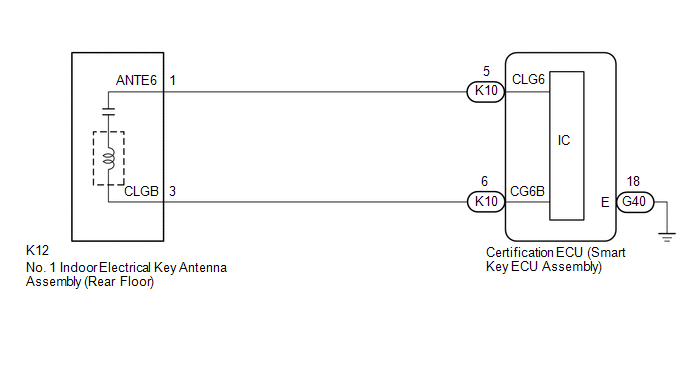
CAUTION / NOTICE / HINT
NOTICE:
- When using the Techstream with the power switch off, connect the
Techstream to the DLC3 and turn a courtesy light switch on and off at
intervals of 1.5 seconds or less until communication between the
Techstream and the vehicle begins. Then select the vehicle type under
manual mode and enter the following menus: Body Electrical / Smart Key.
While using the Techstream, periodically turn a courtesy light switch on
and off at intervals of 1.5 seconds or less to maintain communication
between the Techstream and the vehicle.
- The smart key system (for Start Function, HV Model) uses the LIN
communication system and CAN communication system. Inspect the
communication function by following How to Proceed with Troubleshooting.
Troubleshoot the smart key system (for Start Function, HV Model) after
confirming that the communication systems are functioning properly.
Click here 
- Before replacing the certification ECU (smart key ECU assembly), refer to Registration.
Click here
- After repair, confirm that no DTCs are output by performing "DTC Output Confirmation Operation".
PROCEDURE
|
1. | CHECK CONNECTOR CONNECTION |
(a)
Check that the connectors are properly connected to the certification
ECU (smart key ECU assembly) and No. 1 indoor electrical key antenna
assembly (rear floor).
OK:
Connectors are properly connected.
| NG |
 | CONNECT CONNECTORS PROPERLY |
|
OK |
 | |
| 2. |
CHECK
HARNESS AND CONNECTOR (CERTIFICATION ECU (SMART KEY ECU ASSEMBLY) - NO.
1 INDOOR ELECTRICAL KEY ANTENNA ASSEMBLY (REAR FLOOR)) |
(a) Disconnect the K10 certification ECU (smart key ECU assembly) connector.
(b) Disconnect the K12 No. 1 indoor electrical key antenna assembly (rear floor) connector.
(c) Measure the resistance according to the value(s) in the table below.
Standard Resistance:
|
Tester Connection | Condition |
Specified Condition |
|
K10-5 (CLG6) - K12-1 (ANTE6) |
Always | Below 1 Ω |
|
K10-6 (CG6B) - K12-3 (CLGB) |
Always | Below 1 Ω |
(d) Reconnect the K10 certification ECU (smart key ECU assembly) connector.
| NG |
| REPAIR OR REPLACE HARNESS OR CONNECTOR |
|
OK | |
| |
| 3. |
CHECK CERTIFICATION ECU (SMART KEY ECU ASSEMBLY) (OUTPUT TO NO. 1 INDOOR ELECTRICAL KEY ANTENNA ASSEMBLY (REAR FLOOR)) |
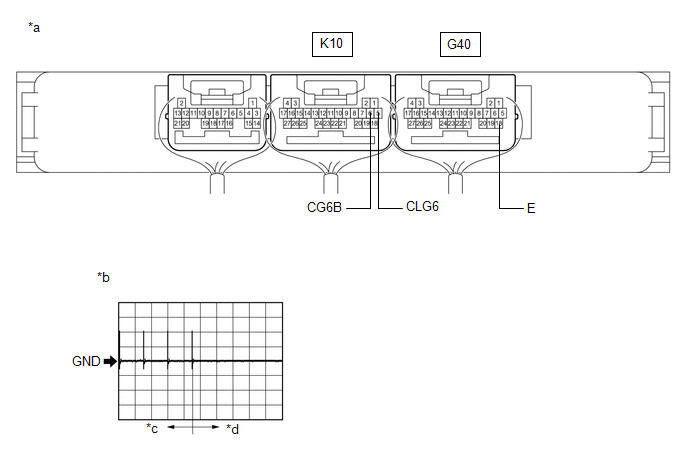
|
*a | Component with harness connected
(Certification ECU (Smart Key ECU Assembly)) |
*b | Waveform |
|
*c | For 30 seconds after any door closed |
*d | After 30 seconds or more have elapsed since any door closed |
(a) Using an oscilloscope, check the waveform.
OK:
|
Tester Connection | Condition |
Tool Setting | Specified Condition |
|
K10-5 (CLG6) - G40-18 (E) | Procedure:
- Power switch off
- Electrical key transmitter sub-assembly not inside vehicle
- Within 30 seconds of closing any door
| 2 V/DIV., 500 ms/DIV. |
Pulse generation (See waveform) |
|
K10-6 (CG6B) - G40-18 (E) | Procedure:
- Power switch off
- Electrical key transmitter sub-assembly not inside vehicle
- Within 30 seconds of closing any door
| 2 V/DIV., 500 ms/DIV. |
Pulse generation (See waveform) |
| OK |
| REPLACE NO. 1 INDOOR ELECTRICAL KEY ANTENNA ASSEMBLY (REAR FLOOR) |
| NG |
| REPLACE CERTIFICATION ECU (SMART KEY ECU ASSEMBLY) |