Components
COMPONENTS
ILLUSTRATION
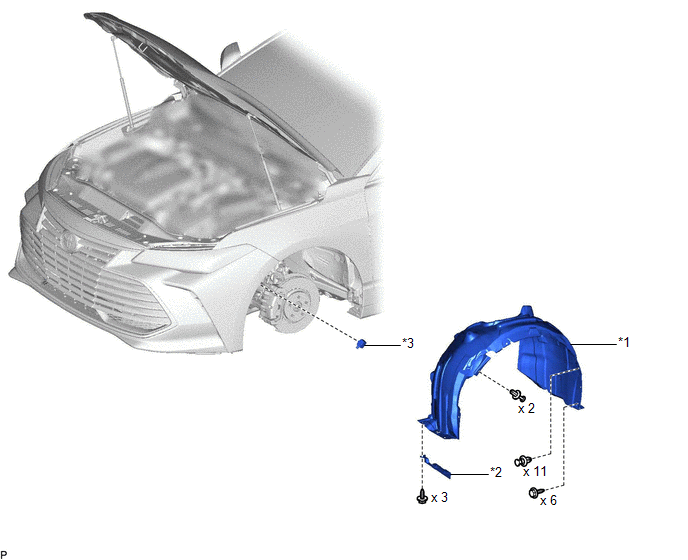
|
*1 | FRONT FENDER SPLASH SHIELD SUB-ASSEMBLY LH |
*2 | FRONT WHEEL OPENING EXTENSION PAD LH |
|
*3 | WIRELESS DOOR LOCK BUZZER |
- | - |
Installation
INSTALLATION
PROCEDURE
1. INSTALL WIRELESS DOOR LOCK BUZZER
(a) Engage the clamp to install the wireless door lock buzzer.
(b) Connect the connector.
2. INSTALL FRONT FENDER SPLASH SHIELD SUB-ASSEMBLY LH
HINT:
Use the same procedure as for the RH side.
Click here

3. INSTALL FRONT WHEEL OPENING EXTENSION PAD LH
HINT:
Use the same procedure as for the RH side.
Click here
4. INSTALL FRONT WHEEL LH
Click here
Removal
REMOVAL
PROCEDURE
1. REMOVE FRONT WHEEL LH
Click here 
2. REMOVE FRONT WHEEL OPENING EXTENSION PAD LH
HINT:
Use the same procedure as for the RH side.
Click here
3. REMOVE FRONT FENDER SPLASH SHIELD SUB-ASSEMBLY LH
HINT:
Use the same procedure as for the RH side.
Click here
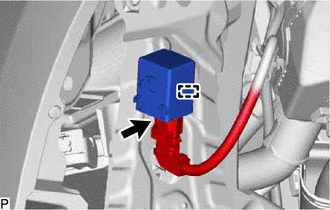
4. REMOVE WIRELESS DOOR LOCK BUZZER
| (a) Disconnect the connector. |
|
(b) Disengage the clamp to remove the wireless door lock buzzer.
Toyota Avalon (XX50) 2019-2022 Service & Repair Manual > Exterior Panels / Trim: Grille Shutter
Components COMPONENTS ILLUSTRATION *1 FRONT RADIATOR SIDE AIR GUIDE PLATE LH *2 FRONT RADIATOR SIDE AIR GUIDE PLATE RH *3 RADIATOR SHUTTER SUB-ASSEMBLY *4 THERMISTOR ASSEMBLY N*m (kgf*cm, ft.*lbf): Specified torque - - ILLUSTRATION *1 MOTOR COVER *2 NO. 1 RADIATOR GRILLE SEAL *3 NO. 2 RADIATOR GRILL ...